Table of Contents
Translating Rosegarden
Quick Start
To work on a translation, you'll need to perform the following steps:
- Build Rosegarden
- Update the .ts Files
- Use Qt Linguist
- Test your translation
- Submit your updated translation for inclusion in Rosegarden.
Details follow…
Build Rosegarden
You will only be able to test your translations if you can build Rosegarden from source.
When doing translations, you'll want to keep up with the latest changes, so it is recommended that you follow the instructions related to using git. Source snapshots can be used instead if you prefer.
Follow the steps on the Building Rosegarden from Source page to build Rosegarden.
Update the .ts Files
Before you start translating, you'll want to make sure all the latest strings and their locations are up-to-date in the “.ts” (translation) files. Once you have the source, use the make-ts script to update the .ts files to match the code.
$ QT_SELECT=qt5 scripts/make-ts
Note: You can have multiple versions of Qt installed. Just in case, I've added “QT_SELECT=qt5” to the command above to make sure you are running the correct version of the Qt tools.
Add a New Translation
Check the data/locale directory to see if a new translation is needed.
You can use the make-ts script (which uses lupdate) to create a new translation. E.g. to make a new Esperanto translation:
$ QT_SELECT=qt5 scripts/make-ts data/locale/eo.ts
Load the file with linguist and be sure to set the source language to English and the target language appropriately (Esperanto in this case).
$ QT_SELECT=qt5 linguist data/locale/eo.ts
Rosegarden may not recognize this new translation at first. Let us know if you are having trouble and we'll work up the remaining steps.
Use Qt Linguist
Next, use Qt Linguist to update the “.ts” (translation) file that you'd like to work on. E.g. if I want to work on the Cantonese translation:
$ QT_SELECT=qt5 linguist data/locale/zh_CN.ts
See the Qt Linguist manual for details.
Test the Translation
Normally, Rosegarden comes up using your default langauge. You can override this using the “LANG” environment variable. To test the French translation:
$ LANG=fr ./build/rosegarden
Submit Your Updated Translation
Once you are finished working on a translation, send the updated .ts file to us. Compress it with xz or bzip if you can. Then post it to the patches tracker:
https://sourceforge.net/p/rosegarden/patches/
You can also send a diff if you prefer. “git diff” can make one. Here's how to make a diff file for the Finnish translation:
$ git diff data/locale/fi.ts >fi.ts.diff
And you can compress it with xz:
$ xz fi.ts.diff
That will give you an fi.ts.diff.xz file to send to us.
Introduction
Rosegarden tries to be friendly toward translators, and in fact many of our developers also double as translators. The more languages we can offer, the better.
 Translators who are new to translating Rosegarden “Thorn” and beyond should be aware of some special issues that exist as a consequence of the development process. We made changes to the translation system as we became more familiar with Qt, and the existing .ts files show the war wounds. You should not miss this section. I advise all of you to keep the note name and keyboard shortcut issues in mind from the beginning, because it is very likely that you will find pre-existing translations that are completely incorrect. (I corrected translations for six languages and found problems in all of them.) I suggest searching for “note name” and “keyboard shortcut” to sort all of those out right from the beginning, so you do not accidentally miss one in the process of going through a long run of approving existing translations that are correct.
Good luck, friends! Now read on!
Translation Coordinator
Translations from outside contributors are coordinated by Thorsten Alteholz translation@alteholz.de. He also keeps up with posting regular updates of the .ts files in trunk/ on every other Sunday during the normal development cycle.
(No regular updates will be posted during a release cycle, because strings are frozen at this time.)
Currently Active Translators
| Names | Languages | File |
|---|---|---|
| Heikki Johannes Junes, Jani Frilander | Finnish | fi.ts |
| Thorsten Alteholz | German | de.ts |
| Yves Guillemot | French | fr.ts |
| Pavel Fric | Czech | cs.ts |
| D. Michael McIntyre | Spanish1), English2) | es.ts |
| Stefan Asserhall | Swedish | sv.ts |
| Citra Paska | Indonesian | id.ts |
| Oota Toshiya | Japanese | ja.ts |
| Alessandro Musesti, Mario Moles, Lorenzo Sutton | Italian | it.ts |
| Édio Mazera | Portuguese | pt_BR.ts |
Abandoned Translations
These translations have not been maintained during the entire Thorn/Qt 4 development cycle (some of them for much, much longer), and are considered abandoned. They are listed in descending order from the most complete to the least complete:
- nl.ts
- pl.ts
- eu.ts
- ca.ts
- zh_CN.ts
- et.ts
- cy.ts
- ru.ts
Getting Started
Environment
Qt Version
Anyone interested in translating Rosegarden will need to have a copy of Qt 5.0 or later available. Older versions of Qt can read the newer files, but saving newer files with an older version of Qt Linguist has caused problems in the past. That is why we require translators to use version 5.0 or later.
Source Code
Anyone interested in translating Rosegarden should begin by following the steps on the Building Rosegarden from Source page. You will want to have the source code available while you translate, so Qt Linguist can show you the code surrounding the string you are translating. You will find many helpful translator comments here in the Sources and Forms window of Linguist that you will not want to do without. Also, some strings won't make any sense without being able to see the source code. (Some strings won't make any sense even when you're looking at the source code! We have one string where %1%2.%3%4.%5%63) are replaced by variables with names like qi, q0, q01, s0, s01. How could any translator mistake what this code does?)
Actively Maintained Languages
If someone is already maintaining your language but you would like to join in, there is a good chance that person would love to have your help. You should get in touch with them. If you need help with this, post a message on rosegarden-devel@lists.sourceforge.net or email Michael michael.mcintyre@rosegardenmusic.com or Thorsten translation@alteholz.de for assistance.
Abandoned Languages
If nobody is maintaining your language, you should jump right in with the .ts file. Follow the steps on the Building Rosegarden from Source page. Then look in the data/locale directory to find the relevant .ts file.
New Languages
If a translation for your language does not already exist, please contact Michael michael.mcintyre@rosegardenmusic.com for assistance. We have not yet encountered this situation, and Michael will need to do a little homework to determine how to go about adding a new language, but he will be more than happy to assist you!
Tools
We recommend Qt Linguist. It is a native Qt tool for a native Qt application, and everything works out really well. Some translators have reported that Linguist crashes for them, and is unusable. Alexandre Prokoudine, our long-time Russian translator, suggests that Virtaal can handle our .ts files as well. If Linguist gives you problems, try Virtaal, and if you find some other tool you'd like to see mentioned here, please say so. We have no desire to dictate the use of particular translation tools, and are only making recommendations based on what has worked for us, in order to try to simplify your job as much as possible.
Translation Testing
Once you have made some changes to your .ts file, you should test the translation to make sure everything is working properly.
Compiling the Translation
You will need to run “make” to rebuild the resource bundle and get your updated translation compiled in. Your changes should be picked up automatically.
make
./rosegarden
Testing with a Different Locale
If your normal locale differs from that of the translation, you can test the the translation in your target locale by adding a “LANG=” to the “./rosegarden” command. For example, to test the French translation from within an English locale, you would use (all on one line):
LANG=fr ./rosegarden
Translation Consistency
English terms and phrases do not always translate very well into other languages, and sometimes it is possible to translate the same thing many different ways. When you encounter a term that might be translated several different ways, try to have a look through your translation to see what choice the previous translator used, and be consistent. Another useful resource for improving consistency is Open Tran, which is well worth a look.
Special Formatting Characters
Many translations will have special characters like <qt> and <p> to control formatting. Additionally, many translations will have special place markers like %1. This sort of thing is explained in some detail in the Qt Linguist Manual, but it is worth repeating here that these special characters should be preserved in your translation. Typically the easiest way to do this is to copy the English text as your translation, and then translate around the tags, moving the %1 markers around as appropriate for your language.
Note Names and Keyboard Shortcuts, B or B?
Note Names
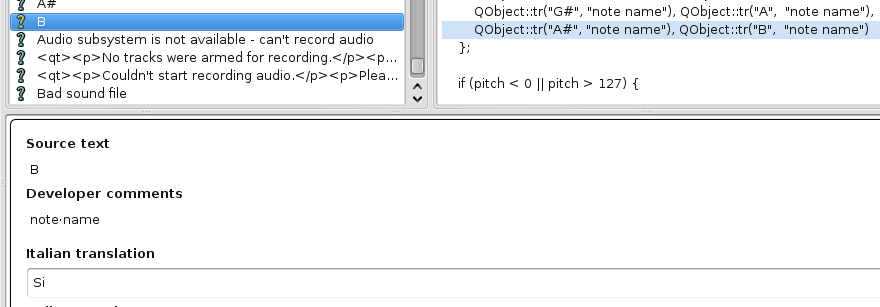
Note names in English are A, A#, Bb, B, B#, Cb, C, C#, Db, D, D#, Eb, E, E#, Fb, F, F#, Gb, G, G#, Ab, A. Some of these conflict with keyboard shortcuts, such as B, so we have resolved the conflict by putting a “(note name)” translator comment with any of the preceding strings that refer to English note names.
Here (click to see full-size) is the note name B in the Italian translation. Take notice of the “(note name)” comment. This translation has only to be marked finished to be ready to go.
Keyboard Shortcuts and What NOT to Translate
New for Thorn and beyond, it is possible to translate keyboard shortcuts. We provide this ability so that you may improve the experience for your users. However, you should understand up front that you do not need to translate the majority of keyboard shortcuts at all. Most keyboard shortcuts should simply be copied directly from the English (or merely marked as finished with no translation, as you prefer), even if your language normally uses other words for things like Shift and Ctrl. Qt will translate these at runtime, and the only reason you need to change a shortcut from the English is if you need to make changes to the way shortcuts are arranged.
In particular, the notation and matrix editors have a note entry shortcut mode that allows you to enter the tonic (I), supertonic (II), and so forth in the active key using Z X C V B and so on. This feature is arranged around an English QWERTY keyboard, such as this one:

If your language uses some other arrangement, such as QWERTZ or AZERTY, this arrangement loses its logical sense, and the user experience can probably be improved by moving some keys around.
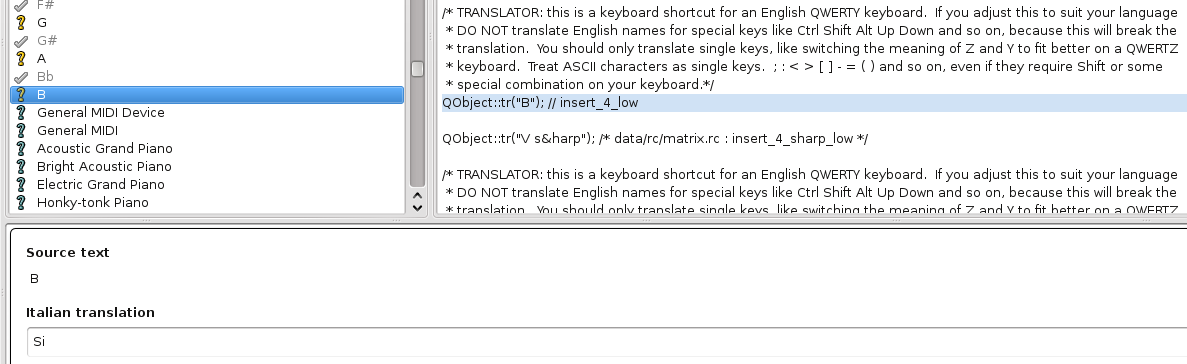
Due to the way development took place, many of these keyboard shortcuts have already been translated into note name equivalents in your target language (if these translations were carried forward from Rosegarden “Classic”) and the order of all these strings will be mixed up in the .ts file, so you cannot rely on context alone. (That is to say B the keyboard shortcut might come right around B# and Cb the note names.) You should be very careful to look out for these, because it is very easy to mistake a B for a B. (So easy, in fact, that the first time I set out to make a screenshot for the section above, I picked the wrong B in the file!)
Here (click to see full-size) is B the keyboard shortcut from the broken Italian translation. It is incorrectly translated as “Si” here, due to the way the development process took place. This error needs to be corrected in order for the shortcut to function, and it should be changed to whatever key is most appropriate for the Italian keyboard layout (probably B).
Tooltips with Shortcuts that SHOULD be Translated
You will find some tooltips that have keyboard shortcuts included in parentheses. It was necessary to do this for various development-related reasons, and this has the unfortunate side effect of creating additional complication for translators. While most special keys (Shift, Media Play, and so on) in shortcuts should never be translated, when these strings are found inside tooltips, they should be translated into your target language for your users' convenience.
All of these tooltips have a TRANSLATOR comment explaining the situation, such as this example of “Quarter Rest (4)”:

Notes:
- If you change any of your shortcuts from the English, and if any of those altered shortcuts are found inside (), you will need to update these translation strings to reflect your new shortcuts. This will not be done automatically.
- If any special keys such as Shift, Up, Down and so on that should not have been translated as keyboard shortcuts appear in these strings, then you should translate them in this context. As it happens, I found one example of a string where the author used [] instead of () to mark the shortcut. (This particular string is not from the same place as all the rest under discussion here, and it does not have a TRANSLATOR comment, so I think it fitting to mention it here.) In English, this reads:
  <code>
  <qt>Use program changes from an external source to manipulate these controls (only valid for the currently-active track) Shift + P]</qt>
  </code>
In the Spanish translation, “Shift+P” was translated:
  <code>
  <qt>Utilizar cambios de programa de fuente externa para manipular estos controles (sólo pertenece a la pista activada) [Mayúsculas + P]</qt>
  </code>
Buttons Stuck in English!
Qt does not support as many languages as KDE, and this has created some problems for translators. Our source code uses correct Qt syntax to create buttons in dialogs in a portable way that allows Qt to adjust these dialogs to suit different local environments (eg. Mac OS-X, Windows, GNOME, KDE). The code is correct, but writing code in this way leaves us dependent on Qt to translate a number of button strings. Most commonly these are OK, Cancel, Apply, Help and so forth. If Qt does not support your language (eg. Finnish) then there is, sadly, no practical way to translate these strings for your users.
I haven't heard anything about this lately. I've just been thinking about the problem, and while I find this limitation of Qt extremely annoying, and I feel indignant about the whole idea of having to hack around it in our code, I think it may be possible to subclass QDialogButtonBox and switch all of our code to use a DialogButtonBox instead, where Rosegarden::DialogButtonBox was a subclass that did its own translations of these strings. I would prefer not to think about this issue again until after Thorn releases, but if Qt does not improve language support at the library level, perhaps we can do this one day. (Sooner if somebody with a vested interest in the problem decides to take this idea and implement it. I'll allow a few new strings to creep in after the string freeze to solve the Finnish translation problem, but I'd prefer not to have to code the work-around myself.)
Monitoring Progress
As you work on your translation, you may wish to step back and take a look at how far you have come, and how far you still have to go. You can run scripts/ts-stats to generate a report like this one. Hopefully the report explains itself well enough that no further explanation is necessary. When you get to 0 unfinished strings, and a status of [%%%%%] you are finally finished!
------------------------------------------------------------------------------
            TRANSLATION STATUS REPORT FOR THE ROSEGARDEN PROJECT
------------------------------------------------------------------------------

                   rosegarden.ts contains 4041 messages

Language   Total     Translated  Untranslated   Unfinished   Obsolete  Status
--------   -----     ----------  ------------   ----------   --------  -------
en         4041      20          4006           5            0         [%%%%-]
en_GB      4041      101         3924           5            0         [%%%%-]
en_US      4041      20          4006           5            0         [%%%%-]
es         4041      3918        76             5            1         [%%%%-]
de         4041      4325        15             14           366       [%%%%-]
fi         4041      4156        184            38           363       [%%%%-]
cs         4041      4043        245            305          302       [%%%%-]
it         4041      3036        1204           1697         251       [%%%--]
fr         4041      3275        1002           2292         300       [%%---]
ru         4041      2973        1261           2598         268       [%----]
sv         4041      2832        1407           4008         250       [-----]
ca         4041      2556        1652           4041         222       [-----]
cy         4041      1946        2268           4041         204       [-----]
et         4041      1974        2206           4041         156       [-----]
eu         4041      2630        1578           4041         219       [-----]
id         4041      1631        2505           4041         126       [-----]
ja         4041      2810        1427           4041         248       [-----]
nl         4041      2827        1419           4041         252       [-----]
pl         4041      2725        1498           4041         235       [-----]
zh_CN      4041      2385        1837           4041         210       [-----]

Total:        total strings that are note obsolete

Translated:   strings that have been translated

Untranslated: strings that have no translation (may be finished)

Unfinished:   strings that have not been marked as finished (may or
              may not have a translation)

Obsolete:     strings were translated, but these translations are no
              longer used in the source (frequently happens after
              someone edits a text to make a correction)

Report produced on Tue, 24 Nov 2009 21:21:17 -0500
Obsolete Strings
Strings become obsolete when they have translations, but the source text no longer exists. In many cases, this is because the source text was edited in some small way. You can usually find an obsolete translation that comes close to matching an untranslated string, and make a few small changes to get the translation working again. (This happens particularly often when the source strings have missing or broken markup tags like </qt> and so on, and someone commits a small update to repair this problem.)
Removing Obsolete Translations
When you have gotten everything you need out of the obsolete strings contained in your translation, you can remove them with the ts-noobsolete make target. Use this with caution if you have commit access to the repository, because you do not want to remove another translator's obsolete strings by accident!
To remove the obsolete strings from the Spanish translation, without affecting anything else, I used:
make ts-noobsolete TRANSLATIONS=data/locale/es.ts
If you wanted to do the same, you would merely replace es.ts with the appropriate filename.
Submitting Your Translation
When you reach a point where you would like your translation update to be posted (it doesn't necessarily have to be complete), you need to make a patch. You will need to have a git-controlled working copy in order to do this. While sitting in the top level rosegarden-git directory, simply run:
git diff > [FILENAME]
I'll just leave it up to you to invent something reasonable for [FILENAME] here.
Once you have produced this patch, simply email it to Thorsten translation@alteholz.de or Michael michael.mcintyre@rosegardenmusic.com and we will post the update as soon as we get a chance.